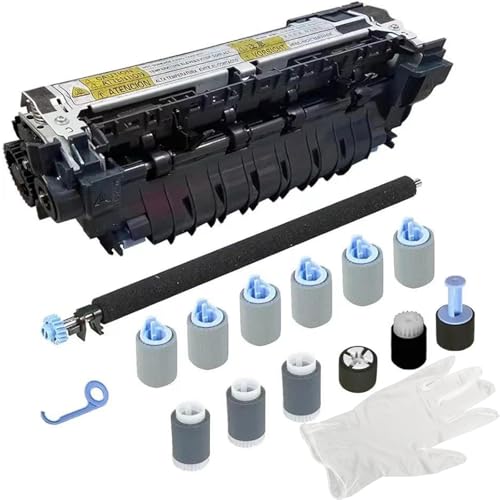




CF064ACF064-67902 Maintenance kit for HP LaserJet M601 M602 M603 Includes RM1-8395 Fuser kit,Transfer Roller,Tray 2 Feed Separation Rollers,Tray PickupSeparationFeed Rollers
The premium CF064A maintenance Kit guarantees a seamless, efficient, and crystal-clear printing experience that you can effortlessly enjoy.
CF064ACF064-67902 Maintenance kit for HP LaserJet M601 M602 M603 Includes RM1-8395 Fuser kit,Transfer Roller,Tray 2 Feed Separation Rollers,Tray PickupSeparationFeed Rollers
Nº de artículo: 112694940

CF064ACF064-67902 Maintenance kit for HP LaserJet M601 M602 M603 Includes RM1-8395 Fuser kit,Transfer Roller,Tray 2 Feed Separation Rollers,Tray

Nº de artículo: 112694940
Sin existencias
Estados Unidos Importado de la tienda USA
Our Top Logistics Partners
  • fedex
  • dhl
The premium CF064A maintenance Kit guarantees a seamless, efficient, and crystal-clear printing experience that you can effortlessly enjoy.
Garantía U-Care:
Ninguno
Selecciona un plan
fast shipping

Fast
Shipping

free return

Free
Return*

secure packaging

Secure Packaging

100% original products

100% Original Products

pci-dss

PCI DSS Compliance

iso certified

ISO 27001 Certified


paypal payment
visa payment
mastercard payment
Note: Step Down Voltage Transformer required for using electronics products of Estados Unidos store (110-120). Recommended power converters Comprar ahora.

What Stands Out

Comprehensive Kit
The CF064A Maintenance Kit includes essential components like the fuser kit and rollers, ensuring your HP LaserJet M601, M602, or M603 runs smoothly and efficiently.
Enhanced Performance
By replacing worn parts, this kit improves print quality and machine reliability, reducing downtime and enhancing productivity for users.
Easy Installation
Designed for simple setup, the CF064A allows users to easily replace parts, minimizing maintenance time and effort to keep printers operational.

Detalles de producto

Shop CF064ACF064-67902 Maintenance kit for HP LaserJet M601 M602 M603 Includes RM1-8395 Fuser kit,Transfer Roller,Tray 2 Feed Separation Rollers,Tray PickupSeparationFeed Rollers online at a best price in Paraguay. B0D8Q254NX
Package Dimensions15.3 x 7.8 x 7.8 inches (38.9 x 19.8 x 19.8 cm)
Item Weight4.62 pounds (2.1 kg)
Item model numberCF064A
Date First AvailableJuly 16, 2024
ManufacturerColinkor

Who Should Buy?

Suitable For
  • Office Environments

    Ideal for offices with high printing volume requiring consistent print quality and reduced maintenance downtime.

  • Print Service Providers

    Suitable for print service providers needing reliable components for continuous large-scale printing operations.

  • Quality-Conscious Users

    Perfect for users prioritizing print quality, ensuring crisp, clear documents through regular maintenance.

Not Suitable For
  • Casual Users

    Not suitable for occasional users who rarely print and don't need advanced maintenance kits.

DESCRIPCIÓN DEL PRODUCTO

CF064ACF064-67902 Maintenance kit for HP LaserJet M601 M602 M603 Includes RM1-8395 Fuser kit,Transfer Roller,Tray 2 Feed Separation Rollers,Tray PickupSeparationFeed Rollers

¿Tienes alguna consulta? Chatea con nosotros

Preguntas y respuestas de los clientes

  • Pregunta: What is included in the CF064ACF064-67902 Maintenance Kit for HP Laserjet M601, M602, and M603?

    Respuesta: The CF064ACF064-67902 Maintenance Kit includes essential components such as the RM1-8395 Fuser Kit, Transfer Roller, Tray 2 Feed Separation Rollers, and Tray. These parts are crucial for maintaining optimal printer performance. By regularly replacing these components, you can ensure high-quality prints and reduce the risk of paper jams or misfeeds. For example, if your printer is producing streaks or faded prints, using this maintenance kit can help restore its print quality efficiently.
  • Pregunta: How often should I replace the maintenance kit for my HP Laserjet M601, M602, or M603?

    Respuesta: It is generally recommended to replace the maintenance kit after the printer reaches a certain page count, typically around 150,000 pages. Regular replacement helps maintain print quality and prevents potential damage to internal components. Tracking your page count and responsiveness of your device can help maximize performance. For instance, if you notice frequent paper jams or reduced print quality, it may indicate that it's time to replace the maintenance kit to restore optimal functionality.
  • Pregunta: Is the CF064ACF064-67902 Maintenance Kit compatible with other HP printers?

    Respuesta: The CF064ACF064-67902 Maintenance Kit is specifically designed for use with the HP LaserJet M601, M602, and M603 models. Using this maintenance kit with other printer models may result in compatibility issues and suboptimal performance. For users of these specific models, employing the correct maintenance kit ensures the continued efficiency and longevity of their printer. Always verify your printer model before making a purchase to avoid any issues.
  • Pregunta: What are the benefits of using the CF064ACF064-67902 Maintenance Kit?

    Respuesta: Using the CF064ACF064-67902 Maintenance Kit can significantly enhance your printer's performance and longevity. It helps improve print quality, reduce downtime, and prevents costly repairs by ensuring that all components function effectively. The kit includes critical replacements that are easy to install, allowing users to maintain their printer's performance seamlessly. For environments that rely heavily on printing, such as offices, timely maintenance is essential to ensure smooth operations.
  • Pregunta: How can I install the components from the CF064ACF064-67902 Maintenance Kit?

    Respuesta: Installing components from the CF064ACF064-67902 Maintenance Kit involves a straightforward process that can be accomplished without professional help. Begin by turning off the printer and accessing the internal compartment. Remove the old components and carefully install the new fuser kit, transfer roller, and rollers as per the provided instructions. It's important to adhere to safety guidelines and handle all parts with care to avoid damaging any components. Following these steps will help optimize your printer's performance efficiently.
  • Pregunta: What tools do I need to install the maintenance kit for my HP Laserjet?

    Respuesta: Typically, installing the CF064ACF064-67902 Maintenance Kit does not require specialized tools. All that's generally needed are basic tools like a Phillips screwdriver, if necessary, and clean hands when handling delicate components. It's best to consult your printer's user manual as well, which may guide you through the installation process. Proper care and attention during installation will help to maintain the efficiency and functionality of your printer.
  • Pregunta: Can I use the maintenance kit if my printer is not producing quality prints?

    Respuesta: Yes, replacing the maintenance kit can help restore print quality issues in your HP LaserJet M601, M602, or M603. If you're experiencing problems such as streaks, smudges, or inconsistent prints, the maintenance kit components, including the fuser and rollers, could be the solution you need. Frequently, these issues stem from worn-out or malfunctioning parts that can be effortlessly replaced using the maintenance kit, ensuring that your printer returns to producing high-quality results.
  • Pregunta: Where can I buy the CF064ACF064-67902 Maintenance Kit in Paraguay?

    Respuesta: You can purchase the CF064ACF064-67902 Maintenance Kit for your HP LaserJet M601, M602, and M603 at Ubuy. Ubuy offers a convenient online shopping experience and provides access to a wide range of replacement parts for your printer. Simply visit their website and search for the maintenance kit to find it and place your order easily.
  • Pregunta: Are there any specific maintenance tips for HP Laserjet M601, M602, and M603 printers?

    Respuesta: To keep your HP LaserJet M601, M602, or M603 in peak condition, regular maintenance is key. Besides using the CF064ACF064-67902 Maintenance Kit, ensure you clean the printer's interior regularly to prevent dust from accumulating on sensitive components. Keep the firmware updated and perform routine checks on toner levels and paper quality. Adhering to these practices will enhance performance and extend the life of your printer, making it a more reliable tool for your printing needs.
  • Pregunta: What should I do if my printer still has issues after replacing the maintenance kit?

    Respuesta: If you continue to experience issues with your HP LaserJet M601, M602, or M603 after replacing the maintenance kit, it may be indicative of underlying problems unrelated to the maintenance components. In such cases, examining additional factors, such as toner quality or paper type, could reveal other obstacles. Referring to the printer’s troubleshooting guide can provide more clarity, and reaching out to technical support may offer further assistance in diagnosing and resolving any persistent issues.

Colinkor Printer Transfer Rollers CF064A Editorial Review

No se encontraron reseñas editoriales

Customer Reviews & Ratings

1 valoraciones de los clientes
  • 5 estrella
    100%
  • 4 estrella
    0%
  • 3 estrella
    0%
  • 2 estrella
    0%
  • 1 estrella
    0%

Revisar este producto

Comparte tus ideas con otros clientes

ventajas

  • High-quality printing performance
  • Easy to install
  • Durable components
  • Improves printer lifespan
  • Comprehensive maintenance solution

Contras

  • Initial setup might take time.

Platform Trust & Buyer Confidence

trustpilot logo
4.2/5 9477 reseñas
Read reviews
JK
Jasmin
Verified buyer

“Great products and very good service: very easy and very fast international delivery.”

9 September 2026 · via Trustpilot
AG
Anke
Verified buyer

“Wonderful online shopping experience, smooth transaction from the start. Payment method works conveniently and delivery is unexpectedly fast and reliable. You go the extra mile for service. What makes this even more amazing, you deliver to Namibia. I will remain a happy Ubuy customer and will increase my purchases for sure! Thank you!”

10 September 2026 · via Trustpilot
H
Hazel
Verified buyer

“Very easy to find the products what you need, and so fast delivery, that’s why I highly recommended to others costumers to used ubuy.”

10 September 2026 · via Trustpilot
O
Opaleye
Verified buyer

“I received exactly what I ordered I was skeptical about your site because that was my first time to order. But the order came timely and neatly packaged. I was not disappointed. Thank you.”

11 September 2026 · via Trustpilot
AC
Adele
Verified buyer

“Easy to find and order what you want on the website. Delivery is quick to the UK”

8 September 2026 · via Trustpilot
Pago seguro Global Delivery Easy Returns Genuine Products

Información importante

  • Limitaciones: Para los productos enviados al extranjero, ten en cuenta que cualquier garantía del fabricante puede no ser válida; las opciones de servicio del fabricante pueden no estar disponibles; los manuales del producto, las instrucciones y las advertencias de seguridad pueden no estar en los idiomas del país de destino; los productos (y los materiales que los acompañan) pueden no estar diseñados de acuerdo con las normas, especificaciones y requisitos de etiquetado del país de destino; y los productos pueden no ajustarse al voltaje del país de destino y a otras normas eléctricas (lo que requiere el uso de un adaptador o convertidor, si procede). El destinatario es responsable de asegurarse de que el producto puede ser importado legalmente al país de destino. Cuando hagas un pedido a Ubuy o a sus filiales, el destinatario es el importador registrado y debe cumplir todas las leyes y normativas del país de destino.
  • No todos los productos que aparecen en Ubuy están a la venta, ya que Ubuy es un motor de búsqueda a nivel mundial. Los productos están sujetos a las normas de exportación/comercio.